---
title: vime-settings
sidebar_label: Settings
---
import Tabs from '@theme/Tabs'
import TabItem from '@theme/TabItem'
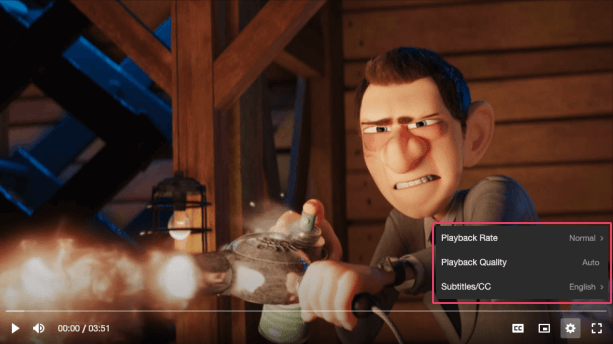
A container for a collection of submenus and options for the player. On desktop, the settings is
displayed as a small popup menu (scroll appears if `height >= maxHeight`) on the bottom right-hand
side of a video player, or slightly above the right-hand side of an audio player. On mobile,
the settings is displayed as a [bottom sheet](https://material.io/components/sheets-bottom).
## Visual
 ## Usage
```html {5-7}
```
```tsx {2,10}
import React from 'react';
import { VimePlayer, VimeUi, VimeSettings } from '@vime/react';
function Example() {
return (
{/* ... */}
{/* ... */}
{/* ... */}
);
}
```
```html {6-8,14,20} title="example.vue"
```
```html {5-7,12} title="example.svelte"
```
```tsx {8}
class Example {
render() {
return (
{/* ... */}
{/* ... */}
{/* ... */}
);
}
}
```
```html {5-7} title="example.html"
```
## Properties
| Property | Attribute | Description | Type | Default |
| ---------------- | ----------------- | ------------------------------------------------------------------------------------------------------------------------------------------------------------------------------------------ | ------------------------------------------------------- | --------------- |
| `active` | `active` | Whether the settings menu is opened/closed. | `boolean` | `false` |
| `controlsHeight` | `controls-height` | The height of any lower control bar in pixels so that the settings can re-position itself accordingly. | `number` | `0` |
| `pin` | `pin` | Pins the settings to the defined position inside the video player. This has no effect when the view is of type `audio` (always `bottomRight`) and on mobile devices (always bottom sheet). | `"bottomLeft" ∣ "bottomRight" ∣ "topLeft" ∣ "topRight"` | `'bottomRight'` |
## Methods
### `setController(id: string, controller: SettingsController) => Promise`
Sets the controller responsible for opening/closing this settings.
#### Returns
Type: `Promise`
## Slots
| Slot | Description |
| ---- | ------------------------------------------------------------------------------- |
| | Used to pass in the body of the settings menu, which usually contains submenus. |
## CSS Custom Properties
| Name | Description |
| ---------------------------------- | ----------------------------------------------- |
| `--vm-settings-border-radius` | The border radius of the settings menu. |
| `--vm-settings-max-height` | The max height of the settings menu. |
| `--vm-settings-padding` | The padding inside the settings menu. |
| `--vm-settings-scroll-thumb-color` | The color of the settings scrollbar thumb. |
| `--vm-settings-scroll-track-color` | The color of the settings scrollbar track. |
| `--vm-settings-scroll-width` | The width of the settings scrollbar. |
| `--vm-settings-shadow` | The shadow cast around the settings menu frame. |
| `--vm-settings-transition` | The CSS transitions for the settings menu. |
| `--vm-settings-width` | The width of the settings menu. |
## Dependencies
### Used by
- [vime-default-settings](default-settings.md)
### Depends on
- [vime-menu](menu.md)
### Graph
```mermaid
graph TD;
vime-settings --> vime-menu
vime-default-settings --> vime-settings
style vime-settings fill:#f9f,stroke:#333,stroke-width:4px
```
---
_Built with [StencilJS](https://stenciljs.com/)_
## Usage
```html {5-7}
```
```tsx {2,10}
import React from 'react';
import { VimePlayer, VimeUi, VimeSettings } from '@vime/react';
function Example() {
return (
{/* ... */}
{/* ... */}
{/* ... */}
);
}
```
```html {6-8,14,20} title="example.vue"
```
```html {5-7,12} title="example.svelte"
```
```tsx {8}
class Example {
render() {
return (
{/* ... */}
{/* ... */}
{/* ... */}
);
}
}
```
```html {5-7} title="example.html"
```
## Properties
| Property | Attribute | Description | Type | Default |
| ---------------- | ----------------- | ------------------------------------------------------------------------------------------------------------------------------------------------------------------------------------------ | ------------------------------------------------------- | --------------- |
| `active` | `active` | Whether the settings menu is opened/closed. | `boolean` | `false` |
| `controlsHeight` | `controls-height` | The height of any lower control bar in pixels so that the settings can re-position itself accordingly. | `number` | `0` |
| `pin` | `pin` | Pins the settings to the defined position inside the video player. This has no effect when the view is of type `audio` (always `bottomRight`) and on mobile devices (always bottom sheet). | `"bottomLeft" ∣ "bottomRight" ∣ "topLeft" ∣ "topRight"` | `'bottomRight'` |
## Methods
### `setController(id: string, controller: SettingsController) => Promise`
Sets the controller responsible for opening/closing this settings.
#### Returns
Type: `Promise`
## Slots
| Slot | Description |
| ---- | ------------------------------------------------------------------------------- |
| | Used to pass in the body of the settings menu, which usually contains submenus. |
## CSS Custom Properties
| Name | Description |
| ---------------------------------- | ----------------------------------------------- |
| `--vm-settings-border-radius` | The border radius of the settings menu. |
| `--vm-settings-max-height` | The max height of the settings menu. |
| `--vm-settings-padding` | The padding inside the settings menu. |
| `--vm-settings-scroll-thumb-color` | The color of the settings scrollbar thumb. |
| `--vm-settings-scroll-track-color` | The color of the settings scrollbar track. |
| `--vm-settings-scroll-width` | The width of the settings scrollbar. |
| `--vm-settings-shadow` | The shadow cast around the settings menu frame. |
| `--vm-settings-transition` | The CSS transitions for the settings menu. |
| `--vm-settings-width` | The width of the settings menu. |
## Dependencies
### Used by
- [vime-default-settings](default-settings.md)
### Depends on
- [vime-menu](menu.md)
### Graph
```mermaid
graph TD;
vime-settings --> vime-menu
vime-default-settings --> vime-settings
style vime-settings fill:#f9f,stroke:#333,stroke-width:4px
```
---
_Built with [StencilJS](https://stenciljs.com/)_