---
title: vime-captions
sidebar_label: Captions
---
import Tabs from '@theme/Tabs'
import TabItem from '@theme/TabItem'
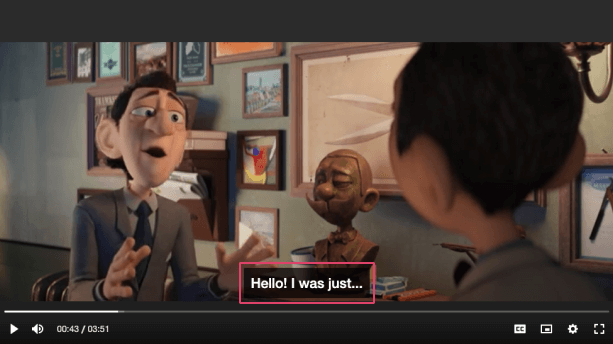
Renders and displays VTT cues by hooking into the `textTracks` player property. This is a simple
implementation that can only handle rendering one text track, and one cue for the given track at a
time (even if many are active). The active track can be changed by setting the mode of any track
in the list to `showing`.
Be aware that after you set the text track mode to `showing`, the component will automatically set
it to hidden to avoid double captions. This also means that this component is **not recommended**
to be used in combination with the native HTML5 player controls.
## Visual
 ## Usage
```html {5}
```
```tsx {2,10}
import React from 'react';
import { VimePlayer, VimeUi, VimeCaptions } from '@vime/react';
function Example() {
return (
{/* ... */}
{/* ... */}
);
}
```
```html {6,12,18} title="example.vue"
```
```html {5,10} title="example.svelte"
```
```tsx {8}
class Example {
render() {
return (
{/* ... */}
{/* ... */}
);
}
}
```
```html {5} title="example.html"
```
## Properties
| Property | Attribute | Description | Type | Default |
| ---------------- | ----------------- | --------------------------------------------------------------------------------------------------- | --------- | ------- |
| `controlsHeight` | `controls-height` | The height of any lower control bar in pixels so that the captions can reposition when it's active. | `number` | `0` |
| `hidden` | `hidden` | Whether the captions should be visible or not. | `boolean` | `false` |
## Events
| Event | Description | Type |
| -------------- | ----------------------------------------------------------------------------------------------------------------------- | ------------------------------------ |
| `vCuesChange` | Emitted when the active cues change. A cue is active when `currentTime >= cue.startTime && currentTime <= cue.endTime`. | `CustomEvent` |
| `vTrackChange` | Emitted when the current track changes. | `CustomEvent` |
## CSS Custom Properties
| Name | Description |
| --------------------------------- | --------------------------------------------------------- |
| `--vm-captions-cue-bg-color` | The background color of active cues. |
| `--vm-captions-cue-border-radius` | The border radius of active cues. |
| `--vm-captions-cue-padding` | The padding around active cues. |
| `--vm-captions-font-size` | Font size of captions when device screen size is <768px. |
| `--vm-captions-font-size-large` | Font size of captions when device screen size is >992px. |
| `--vm-captions-font-size-medium` | Font size of captions when device screen size is >768px. |
| `--vm-captions-font-size-xlarge` | Font size of captions when device screen size is >1200px. |
| `--vm-captions-text-color` | The color of the captions text. |
| `--vm-captions-z-index` | The position in the UI z-axis stack inside the player. |
## Dependencies
### Used by
- [vime-default-ui](default-ui.md)
### Graph
```mermaid
graph TD;
vime-default-ui --> vime-captions
style vime-captions fill:#f9f,stroke:#333,stroke-width:4px
```
---
_Built with [StencilJS](https://stenciljs.com/)_
## Usage
```html {5}
```
```tsx {2,10}
import React from 'react';
import { VimePlayer, VimeUi, VimeCaptions } from '@vime/react';
function Example() {
return (
{/* ... */}
{/* ... */}
);
}
```
```html {6,12,18} title="example.vue"
```
```html {5,10} title="example.svelte"
```
```tsx {8}
class Example {
render() {
return (
{/* ... */}
{/* ... */}
);
}
}
```
```html {5} title="example.html"
```
## Properties
| Property | Attribute | Description | Type | Default |
| ---------------- | ----------------- | --------------------------------------------------------------------------------------------------- | --------- | ------- |
| `controlsHeight` | `controls-height` | The height of any lower control bar in pixels so that the captions can reposition when it's active. | `number` | `0` |
| `hidden` | `hidden` | Whether the captions should be visible or not. | `boolean` | `false` |
## Events
| Event | Description | Type |
| -------------- | ----------------------------------------------------------------------------------------------------------------------- | ------------------------------------ |
| `vCuesChange` | Emitted when the active cues change. A cue is active when `currentTime >= cue.startTime && currentTime <= cue.endTime`. | `CustomEvent` |
| `vTrackChange` | Emitted when the current track changes. | `CustomEvent` |
## CSS Custom Properties
| Name | Description |
| --------------------------------- | --------------------------------------------------------- |
| `--vm-captions-cue-bg-color` | The background color of active cues. |
| `--vm-captions-cue-border-radius` | The border radius of active cues. |
| `--vm-captions-cue-padding` | The padding around active cues. |
| `--vm-captions-font-size` | Font size of captions when device screen size is <768px. |
| `--vm-captions-font-size-large` | Font size of captions when device screen size is >992px. |
| `--vm-captions-font-size-medium` | Font size of captions when device screen size is >768px. |
| `--vm-captions-font-size-xlarge` | Font size of captions when device screen size is >1200px. |
| `--vm-captions-text-color` | The color of the captions text. |
| `--vm-captions-z-index` | The position in the UI z-axis stack inside the player. |
## Dependencies
### Used by
- [vime-default-ui](default-ui.md)
### Graph
```mermaid
graph TD;
vime-default-ui --> vime-captions
style vime-captions fill:#f9f,stroke:#333,stroke-width:4px
```
---
_Built with [StencilJS](https://stenciljs.com/)_